Plugins
Honeyframe uses the word "plugin" for two completely different things. Read the right section.
| If you want to… | Read |
|---|---|
| Install Oracle / MongoDB / Snowflake / FAISS / Torch / etc. drivers | Driver plugins below |
| Author or install a vertical (healthcare, finance, retail) | Vertical plugins below |
Driver plugins
What they are. Optional pip packages that ship connector drivers Honeyframe doesn't bundle by default. The base install supports PostgreSQL + MySQL + MariaDB + the platform's own metadata store out of the box; everything else (Oracle, MSSQL, Mongo, Snowflake, BigQuery, Chroma, FAISS, Torch, etc.) is opt-in to keep the base tarball small and ABI-stable.
Catalog
These are the aliases recognised by --install-plugins and by the
plugins: field in install.conf. The right column is the pip
package each alias resolves to.
| Alias | Package | Use for |
|---|---|---|
chroma / chromadb | chromadb | Vector storage |
faiss | faiss-cpu | Vector storage (alternative to Chroma) |
oracle / oracledb | oracledb | Oracle Database connector |
mysql | pymysql | MySQL / MariaDB driver (extra features beyond bundled) |
mssql | pymssql | Microsoft SQL Server connector |
mongo / mongodb | pymongo | MongoDB connector |
snowflake | snowflake-connector-python | Snowflake connector |
bigquery | google-cloud-bigquery | BigQuery connector |
ga4 | google-analytics-data | Google Analytics 4 ingestion |
oss | oss2 | Alibaba OSS object storage |
torch | torch | Local LLM / embedding inference |
Adding a new alias: edit PLUGIN_MAP in iaas/scripts/setup-customer.sh
and rebuild the tarball. Aliases never make it into the live UI —
they're install-time only.
Installing at install time
In install.conf:
customer:
  name: acme
  display_name: Acme Robotics
# ...
plugins: chroma,oracle,snowflake
Runs as part of setup-customer.sh. Plugins are installed before the
backend service starts, so the first boot sees them.
Installing later
sudo /opt/honeyframe/iaas/scripts/setup-customer.sh \
  --install-plugins chroma,oracle,snowflake
Skips the rest of the install — only installs the listed plugins.
Where they live
/data/honeyframe/plugins/ # actual install target
This path is on the data dir, not the install dir. That's
deliberate — it means a tarball upgrade (tar xzf hub-platform-vN.tar.gz)
doesn't blow away your installed drivers. The systemd unit's
PYTHONPATH includes this directory so the Nuitka-compiled binary
picks them up at boot.
Verifying installation
ls /data/honeyframe/plugins/    # one dir per top-level package
sudo systemctl status hub-platform   # service should still be active
curl -s http://localhost:8001/api/health
The Connectors page in the UI will surface the new types
automatically — GET /api/connectors/catalog introspects which
drivers are importable at runtime.
Vertical plugins
What they are. Architectural extension points that let entire verticals — healthcare, finance, retail — ship as drop-in packages instead of forks of the base platform. A new customer in a new vertical installs PaaS + their vertical plugin and gets a working product without ever seeing other verticals' UI or dbt models.
The plugin.yaml contract
Validated by paas/backend/services/plugin_host.py::PluginManifest.
Only name, version, and display_name are required.
name: healthcare              # lowercase slug, hyphenated
version: 1.0.0                # semver — plugins version independently of PaaS
display_name: Honeyframe — Healthcare

# FastAPI router entry points — dotted Python paths to a router
# instance. PaaS will include each one at startup.
# Empty list = backend-less plugin.
routers:
  - plugins.healthcare.backend.routers.records:router
  - plugins.healthcare.backend.routers.facilities:router

# Path (relative to plugin root) of the dbt workspace. Tenants on
# this vertical get this slug added to PLATFORM_SHARED_DBT_SLUGS.
dbt_workspace: dbt/

# Build-time merges — frontend bundler reads this when assembling
# the SPA for tenants on this vertical.
frontend_overrides:
  routes:
    /records: plugins/healthcare/frontend/RecordList.tsx
  blocks:
    RecordCard: plugins/healthcare/frontend/RecordCard.tsx

# Recipes seeded into honeyframe.flow_recipes at install time.
known_scripts:
  - slug: extract_records
    display_name: an external source Extractor
    script_path: plugins/healthcare/scripts/extract_records.py
    output_schema: raw_records

# Dataset templates installed for new projects on this vertical.
dataset_templates: []

# Default dashboards.
dashboard_seeds: []
Where vertical plugins live
| Path | Owned by | Survives upgrade |
|---|---|---|
/opt/honeyframe/plugins/<name>/ | Tarball (immutable) | No — overwritten on every upgrade |
/data/honeyframe/plugins/<name>/ | Customer (mutable) | Yes |
Bundled platform plugins ship in $INSTALL_DIR/plugins/ — the
healthcare / finance / retail packages the platform team
distributes. Customer-installed extras (a vertical the platform
doesn't ship by default, or a forked copy of a bundled one) go in
$DATA_DIR/plugins/.
This split mirrors the v0.0.32 .env move: immutable platform code
in install-dir, mutable customer state in data-dir. The plugin
contract follows the same boundary.
The Plugins admin page
/plugins (admin role only — surfaced under the "More" menu) renders
the live discovery output as a table. As of v0.0.38, the page also
exposes per-org and per-tenant enable/disable toggles — a plugin can
be discovered by the platform and enabled for one org while staying
off for another.
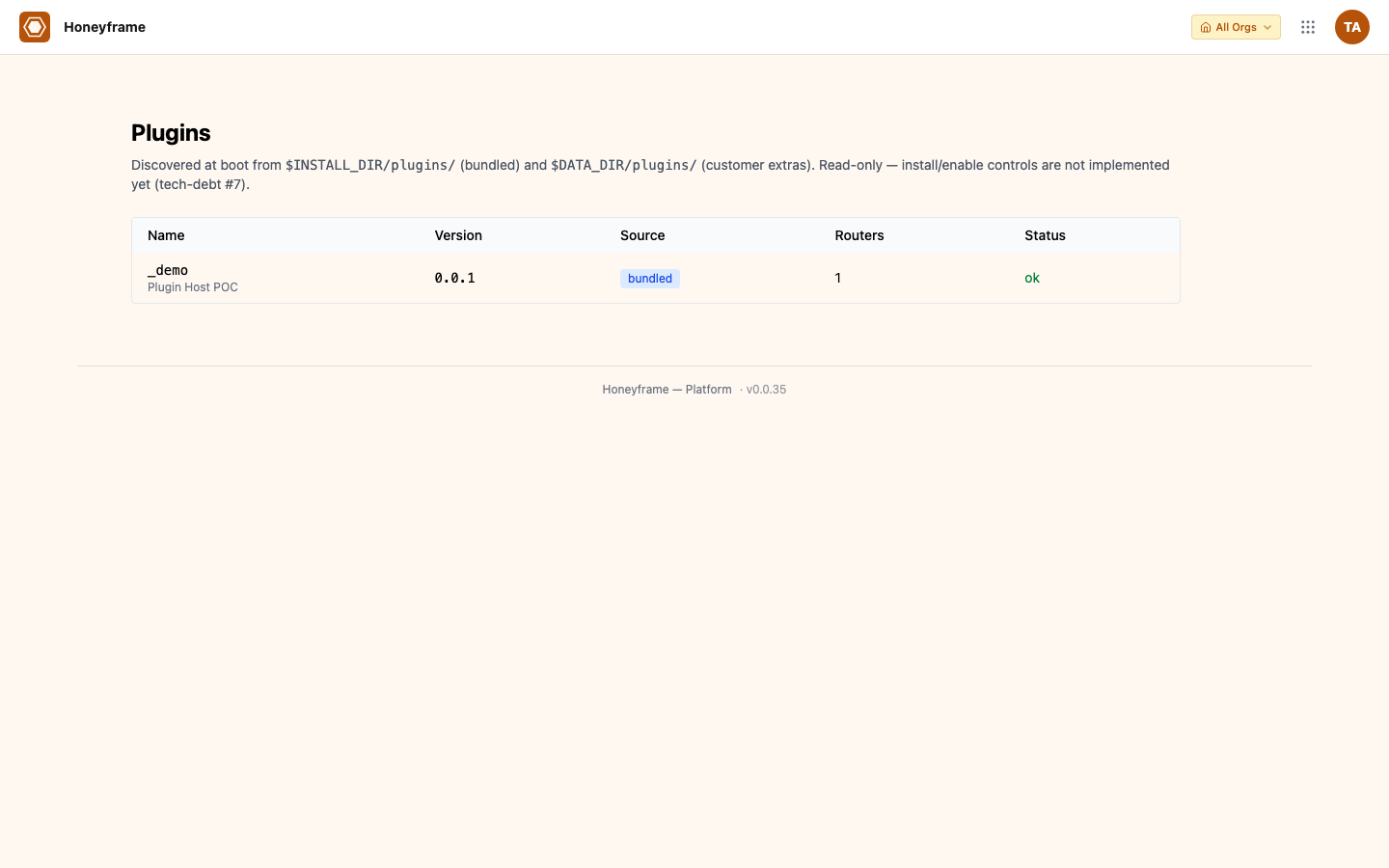
The same data is available from the API:
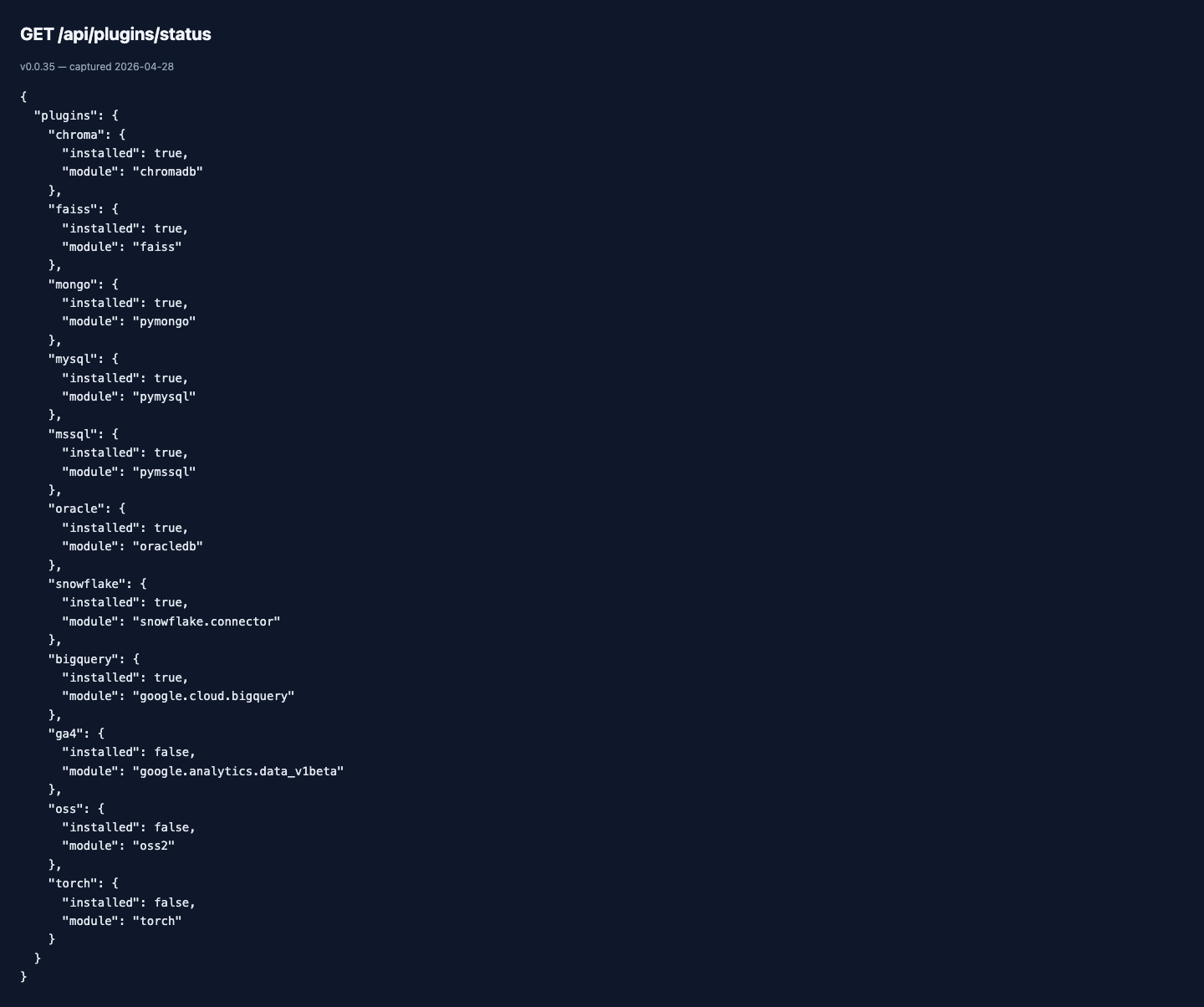
/api/plugins/status is also what the Connectors page polls to grey
out connector types whose driver isn't installed (so a tenant can
see "Oracle (driver not installed)" instead of a confusing failure
when picking a type).
Per-org and per-tenant enablement (v0.0.38)
Three layers control whether a vertical plugin is visible to a given caller:
- Discovered — the manifest validates and the platform sees it.
Set at the filesystem (under
<INSTALL_DIR>/plugins/<slug>/). - Org enabled —
POST /api/plugins/{slug}/enableflips it on for an org. Toggles surface in the Plugins admin page; admins of that org see them. - Tenant enabled — within an org that has the plugin enabled, individual tenants can opt in or out. Used for staged rollouts.
Every enable/disable transition writes an entry to the audit log
(audit.events, event_type = plugin_state_change) with the actor,
target plugin, target scope, and timestamp. The audit log is the
source of truth for "when did this go live in production?" — the
plugin's own runtime state is intentionally separate from how it
was enabled.
Plugin-declared dbt workspaces (v0.0.38)
A vertical plugin can declare its own dbt workspace in plugin.yaml:
dbt_workspaces:
  - slug: healthcare
    profile: healthcare
    project_dir: dbt/
On enable, the platform auto-registers the workspace alongside the
platform's bundled honeyframe workspace. Models in the plugin's
workspace are buildable from the Flow canvas without a
manual PLATFORM_SHARED_DBT_SLUGS edit. On disable, the workspace
is unregistered (models stay on disk; they just stop appearing in
the UI).
Build-time frontend override aggregator (v0.0.38)
For UI overrides, plugins ship React components that the platform
substitutes for built-in surfaces (e.g. healthcare's bespoke records
dashboard replaces the generic dashboard view for that vertical).
The aggregator runs at portal-build time, scans every
plugins/*/frontend/overrides.json, and produces a single import
manifest the runtime consumes via the useOverride hook:
import { useOverride } from '@platform/plugin-host';

function DashboardView() {
  const Override = useOverride('dashboard.view');
  return Override ? <Override /> : <DefaultDashboardView />;
}
The hook returns null when no plugin claims the override key, so
the default surface is the fallback. Multiple plugins claiming the
same key resolve in declared-priority order; the first match wins.
Discovery output (logs)
At PaaS startup, the plugin host walks
<INSTALL_DIR>/plugins/*/plugin.yaml, validates each manifest, and
logs a one-line summary you can read with journalctl:
INFO plugin_host: 2 plugins discovered (2 ok, 0 invalid)
Invalid manifests log a WARNING with the validation errors and are skipped — they do not block startup.
Authoring a new vertical plugin
Minimum viable plugin that loads cleanly today:
plugins/your_vertical/
└── plugin.yaml
name: your-vertical
version: 0.1.0
display_name: Your Vertical
That's it. Discovery sees it, validates it, logs it. Mounting is a no-op until tech-debt #7 lands the rest of the host.
When the rest of the host ships, the same manifest will start to actually do something — without any change on your side as long as you stay within the documented schema.
Migration: saas/ → plugins/healthcare/
Honeyframe's healthcare vertical currently ships in saas/ as a
sibling app. The cutover plan, in order:
- Define the entry-point contract (
plugin.yaml,plugin_host.py) — done - Move SaaS healthcare routers under the contract one router at a time, with both old and new paths active — pending
- Build a frontend plugin loader that mounts component overrides — pending
- Register the SaaS dbt workspace via the manifest instead of the
hardcoded
PLATFORM_SHARED_DBT_SLUGSset — pending - Cut over: remove
saas/backend/main.py, renamesaas/frontend/→plugins/healthcare/frontend/— pending - A finance vertical becomes
plugins/finance/— pending
Until step 2 lands, don't put new verticals in saas/ — start
them under plugins/ directly so the eventual extraction is one
less migration.
Naming clash — why "plugins" means two things
Honeyframe is mid-rebrand from dataintel to honeyframe and the
vertical-plugin host landed during that window (2026-04-25). The
existing --install-plugins CLI shipped earlier in v0.0.31 with a
narrower meaning (drivers only). Renaming either is breaking; both
ship as "plugins". This page disambiguates them; future docs and
error messages should always qualify which kind:
- "driver plugin" — the pip-installed connector drivers
- "vertical plugin" — the
plugin.yaml-described extension package
If you find a doc or error message that says "plugin" without the qualifier, that's a bug — file an issue.