Connectors
A connector tells Honeyframe how to reach an external system — a database, an object store, a vector index, an LLM API, a messaging channel, or an orchestrator. Connectors belong to the organization: an org admin (or anyone with connector.edit) configures one once, and every project in the org can reference it from datasets, recipes, and agent tools.
Each connector type is registered with the platform; the catalog endpoint (GET /api/connectors/catalog) returns every type the running install supports, with its configuration form schema, plus any connector types contributed by installed plugins (plugin:<plugin_id>:<component>).
Queryable vs non-queryable
Connectors split into two groups. Only a queryable connector can back a dataset or a SQL query; the list endpoint reports this per connector as is_queryable.
Queryable — databases and warehouses:
- PostgreSQL (
postgresql). - MySQL (
mysql) and MariaDB (mariadb, same driver). - Microsoft SQL Server (
sqlserver). - Azure Synapse SQL pools (
synapse) — same driver path as SQL Server. - Oracle (
oracle) — schema and table names must be uppercase. - Teradata (
teradata) — needs the optionalteradatasqldriver; without it the connector reports a clear error at connect time. - Databricks SQL warehouses (
databricks) — server hostname, HTTP path, and a personal access token; needs the optionaldatabricks-sql-connectordriver. - Snowflake (
snowflake). - BigQuery (
bigquery). - SAP HANA (
saphana) — on-prem and HANA Cloud through thehdbclidriver. TLS via theencrypt/sslValidateCertificatetoggles; the schema defaults to the uppercase username. - MongoDB (
mongodb) — document store, queryable through the dataset surface. - Elasticsearch (
elasticsearch) — full-text search and aggregations. - REST API (
api_rest) — generic HTTP connector for sources without a first-class driver. - CSV / Excel upload (
csv) — persists uploaded files as a managed dataset. Uploads are subject to the reverse proxy's request-size limit (200 MB in the shipped nginx configuration).
Non-queryable — used by other surfaces (ingestion, agents, knowledge banks, automation, notifications):
- Object storage —
s3_storage,gcs_storage,oss_storage. Not queried through the connector itself; files are read through the lakehouse layer (Delta / Parquet). - Document and file sources —
sharepoint(SharePoint Online via Microsoft Graph),google_drive(Drive API v3),google_sheets(Sheets API v4, service-account auth). SharePoint and Drive sync files into a managed folder, manually or on a schedule. - Analytics and marketing APIs —
google_analytics(GA4 extraction),meta_graph(Meta Graph API organic metrics),google_business_profile(Business Profile Performance API, OAuth). - LLM providers —
openai_llm,anthropic_llm,gemini_llm,bedrock_llm(Amazon Bedrock),azure_openai_llm,mistral_llm,cohere_llm,huggingface_llm,ollama_llm, andopenai_compatible_llm(any OpenAI-shaped endpoint, such as a self-hosted gateway). Every LLM type ends in_llm. Used by agents, the SQL assistant, Cobuild, the dashboard chat panel, and Knowledge Bank retrieval; governed centrally by LLM Mesh. - Vector stores —
builtin_vector(built in, no extra dependency),pgvector(stores vectors in the platform database),chromaandfaiss(these two need their driver plugin), andpinecone(needs thepineconeSDK installed; registered by the platform but not offered in the connector form). Persist embeddings for a Knowledge Bank. - MCP —
remote_mcp, a remote Model Context Protocol server whose tools are exposed to agents. Outbound calls are SSRF-guarded. - Orchestration —
n8n_webhook(fire an event at an n8n workflow),airflow(Airflow REST API) anddagster(Dagster GraphQL API); the last two are what thetrigger_orchestratorscheduler step calls. - Messaging and notifications —
slack_webhook(incoming webhook),slack_bot(bot token: posts and file uploads),telegram_bot,twilio_messaging(SMS / WhatsApp through Twilio),webhook(generic JSON POST with optional auth and extra headers), andsmtp_email(an SMTP relay). Notifications from scenarios and alerts are delivered through these connectors.
Older installs may hold legacy type names that the registry still resolves (for example rds → postgresql). Use the canonical names listed above for new connectors.
Configuring a connector
The Connectors page lists every connector in the organization. On a fresh install it's empty:
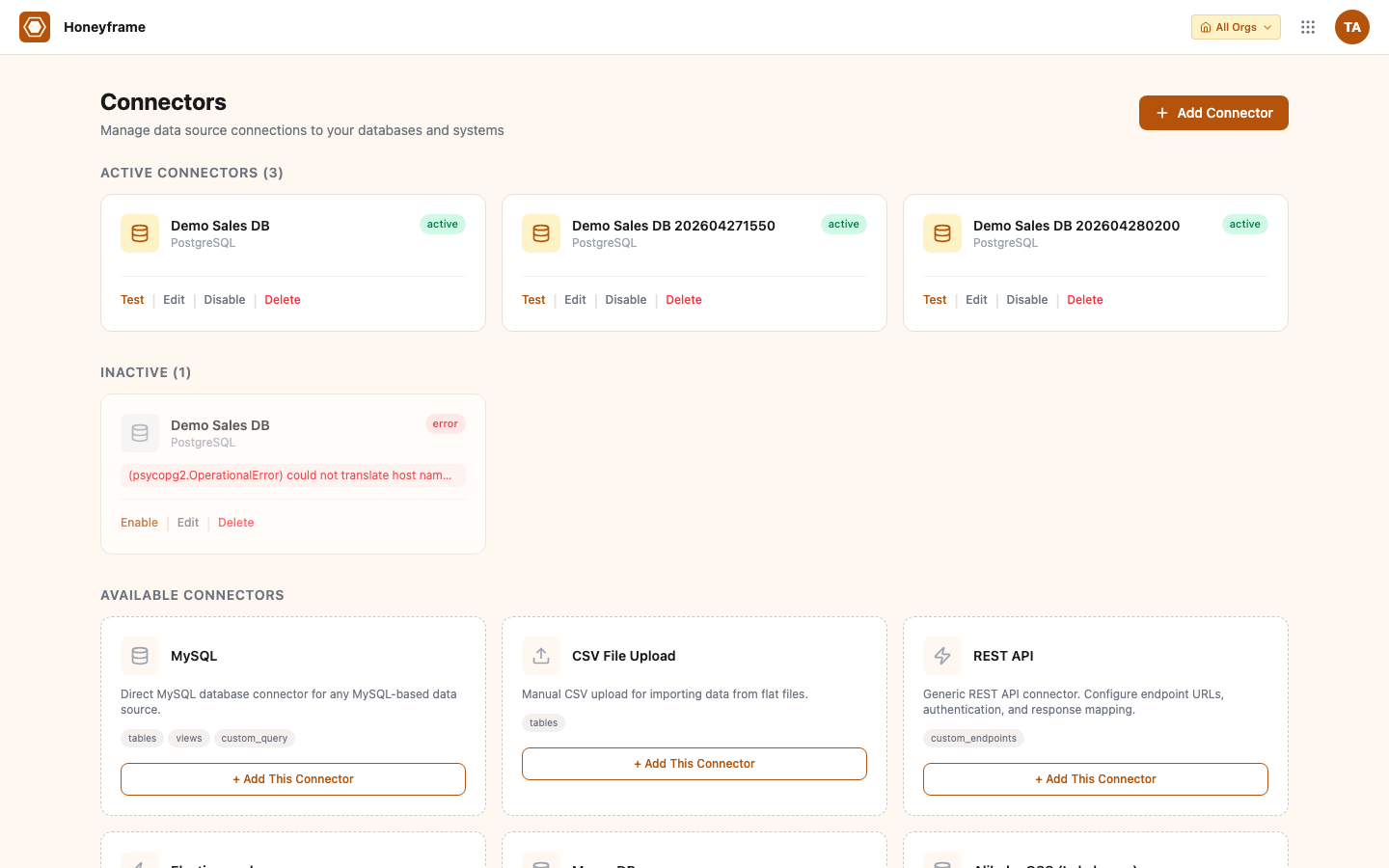
Click + Add Database Connector (or + Add Connector for non-DB types) to open the type picker. Honeyframe shows every supported type with a short description:
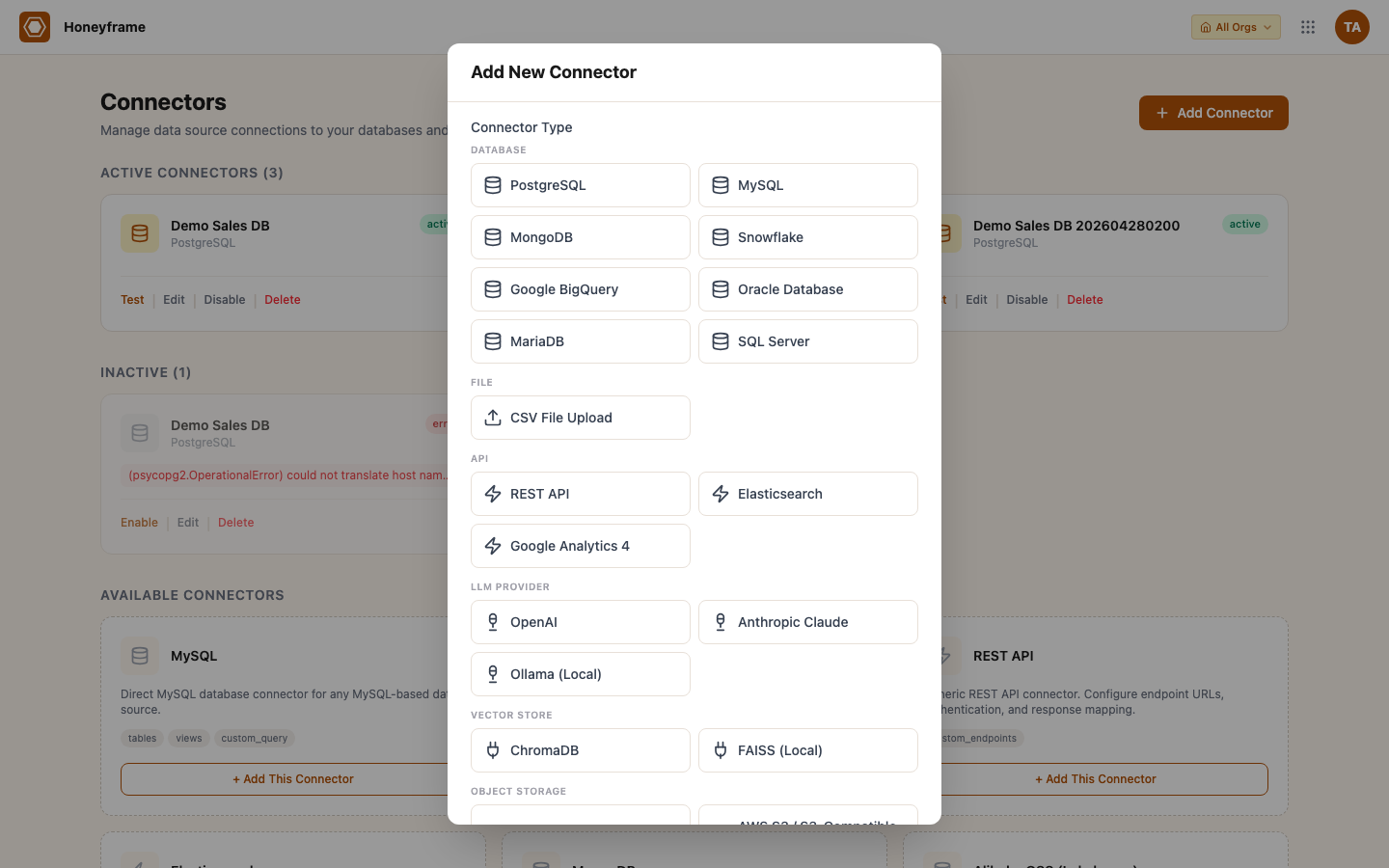
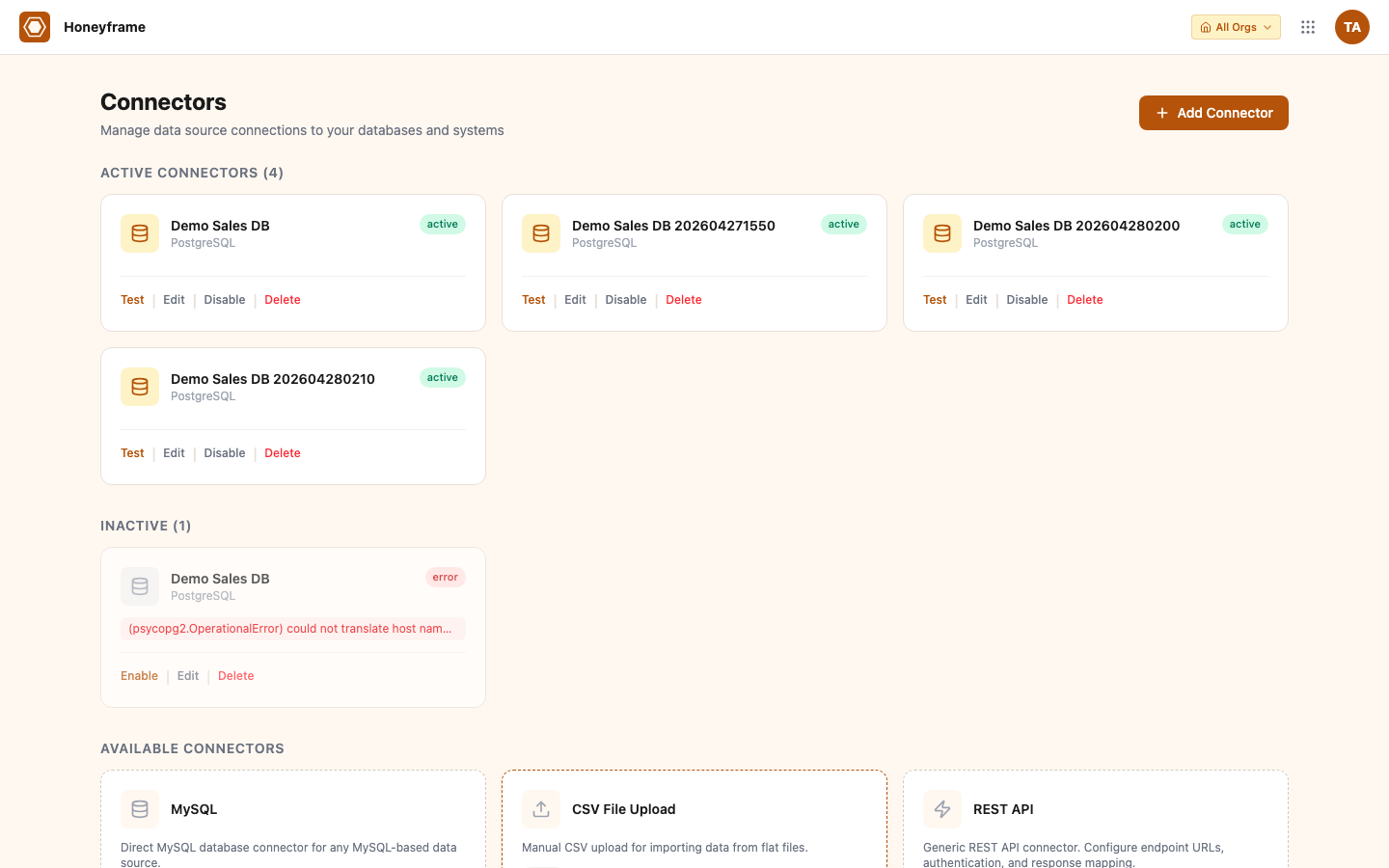
After picking a type, fill the type-specific fields (host / port / credentials for SQL, API base URL + key for REST APIs, bucket + region for object storage, etc.) and submit. The new connector appears in the catalog with a Test button:
In the platform UI:
- Open the Connectors page in the sidebar.
- Click + New Connector and pick a type from the catalog.
- Fill in the connection parameters. Sensitive fields (passwords, API keys, tokens) are encrypted at rest with AES-GCM, separately from the rest of the configuration. GET responses mask secrets with
••••••••; PUT preserves the sentinel so unchanged secrets stay untouched. - Test verifies the connection without saving. The result lands in the test history pane.
- Save stores the connector. It becomes selectable when creating datasets, recipes, or agent tools.
Programmatically:
curl -X POST https://platform.your-domain.com/api/connectors \
  -H "Authorization: Bearer $TOKEN" \
  -H "Content-Type: application/json" \
  -d '{
    "name": "Production Postgres",
    "connector_type": "postgresql",
    "config": {
      "host": "db.example.com",
      "port": 5432,
      "database": "analytics",
      "user": "honeyframe_ro",
      "password": "<redacted>",
      "sslmode": "require"
    },
    "output_schemas": ["public", "marts"]
  }'
output_schemas is the list of schemas the platform may discover and read from. Leave it empty to default to the connector's "owned" schemas; set it explicitly to restrict what shows up in the dataset browser.
Auto-sync schedule
Queryable connectors can be created with an attached schedule via the bootstrap endpoint:
curl -X POST https://platform.your-domain.com/api/connectors/bootstrap \
  -H "Authorization: Bearer $TOKEN" \
  -H "Content-Type: application/json" \
  -d '{
    "name": "Production Postgres",
    "connector_type": "postgresql",
    "config": {...},
    "schedule_cron": "0 2 * * *",
    "schedule_mode": "incremental"
  }'
schedule_mode is incremental (only changed rows since the last successful run, requires a watermark column) or full (truncate + reload). The scheduler runs every minute; the cron expression decides which connectors fire. Skipped runs are logged but not retried — the next cron tick is the next chance.
Permission model
Connector access is governed by two permissions (v0.0.55), so designers can manage data sources without full org-admin rights:
| Endpoint group | Permission |
|---|---|
| Catalog, scripts, list, get, models (read paths) | connector.read |
POST, PATCH, DELETE, test, bootstrap, send-message | connector.edit |
Per-role implicit grants (mirrors the seed migration):
| Role | Connector access |
|---|---|
admin | all (via the role == 'admin' shortcut) |
designer | connector.{read,edit} |
analyst | connector.read |
viewer | none |
The Connectors page sits next to Datasets in the Data section of the sidebar — it moved out of Administration in v0.0.55. Connectors are a data construct, not pure admin.
Connectors are organization-level resources. Beyond the two permission strings, a connector's security.usable_by setting restricts who may reference it (see Per-user credentials). Anyone with connector.read can see the list. Sharing of the data flows through datasets — see Users & Groups — not connectors.
The connector is the credential. The dataset is the unit of access control.
Credential vault
Recognized secret fields (password, api_key, auth_token, access_token, service-account keys, and so on — a fixed list per connector type, including nested credential fields) are encrypted at rest with AES-GCM, separately from the plain configuration. Fields a type doesn't declare as secret are never silently encrypted.
The encryption key is LLM_KEY_ENCRYPTION_KEY when the operator sets it (base64 of 32 random bytes, openssl rand -base64 32); otherwise it is derived from the platform's JWT_SECRET, so no extra setting is required. Rotating JWT_SECRET without setting an explicit key makes existing secrets undecryptable — set LLM_KEY_ENCRYPTION_KEY first if you plan to rotate.
Upgrading from an older release. Connectors created before the vault existed may still carry plaintext secrets. The schema migrations that run during an upgrade move them into the vault automatically and blank the plaintext copy; no manual step is needed.
Credential rotation (v0.0.86)
Connectors support versioned credential rotation with rollback. Every rotation snapshots the previous encrypted blob (plus the clean config) into honeyframe.connector_secret_history — no plaintext is ever stored, and the history cascades on connector delete.
POST /api/connectors/{id}/rotate— merge new secret values (leaving••••keeps the current value), run a dry-run health check on the merged config, then snapshot-then-commit only if the check passes. On failure it returns without mutating;force_save=trueoverrides and stamps the history rowtest_status='failed'.GET /api/connectors/{id}/secret-history— paginated history (metadata only, never the encrypted blob).POST /api/connectors/{id}/rollback/{history_id}— restore a prior version. It re-tests first and has no force flag — you don't roll back into another broken state.
In the UI, a Rotate link on every connector card opens a drawer with secret fields only, an optional reason, Test & save / Save anyway, and a collapsible history list with per-row Rollback. Status badges (passed / skipped / failed / rollback) are color-coded.
Usage rollup (v0.0.86)
Each connector card surfaces how it's being used. GET /api/connectors/{id}/usage returns counts plus the 10 most recent datasets and agent tools that reference the connector. The list endpoint inlines dataset_count, agent_tool_count, and last_used_at via subqueries (one round-trip, no N+1), so every card renders 📦 N datasets · 🔧 N tools · ⏱ Xh ago. A small activity dot summarises last-touched freshness (v0.0.88).
LLM Mesh
LLM Mesh governs the org's LLM connections centrally, so a single policy controls spend and access across every agent and chat surface rather than per-connector settings. Policies live in honeyframe.llm_connection_policies and are enforced at the chat dispatch chokepoint:
- Budget — block calls once a connection exceeds its monthly budget.
- Allow-list — restrict which models a connection may call.
- Rate limit + concurrency — a per-connection request rate cap and a concurrency semaphore.
- Banned terms — a guardrail on prompts routed through the connection.
The LLM Mesh surface lives at /llm-mesh (GET /overview, GET/PUT /policies/{id}, GET /usage) and is also folded into the /connectors page as an LLM Mesh section on the connector modal.
Per-user credentials
A connector can be configured so each user supplies their own credentials rather than sharing one service account (honeyframe.connector_user_credentials, AES-GCM encrypted). Connector config also carries usage_params.allow_write (whether the connection may be written to), security.usable_by (who may reference it), and naming_rules (a table_prefix / table_suffix convention for created tables). Users manage their own credentials at /profile/credentials.
Catalog adapters (per-org)
The metadata catalog is no longer hardwired to dbt. Each org carries a catalog_config JSONB adapter list (default [{"adapter":"dbt"}]), so two orgs on one install can resolve metadata from different sources without sharing a global adapter set.
GET /api/catalog/config(project.view) — the org's adapter list. A NULL, empty, or non-list payload falls back to the dbt-only default — never an empty list.PUT /api/catalog/config(org.admin) — replace the adapter list. Unknown adapter names and duplicateinstance_namevalues are rejected with400; a successful write logs acatalog.config.updatedaudit row.GET /api/catalog/engine/PUT /api/catalog/engine(org.admin) — the org's engine profile (dbtornative). See Flow → Build engines for what the native engine does. An emptycatalog_configalways falls back to dbt; the native engine is a separateengine_profilecolumn, so it is unaffected.
API reference
| Endpoint | Description |
|---|---|
GET /api/connectors/catalog | Available connector types with config schemas and each type's secret fields, plus plugin-contributed types. |
GET /api/connectors | List the org's connectors (?category=llm filters by category). |
GET /api/connectors/{id} | One connector's full config (sensitive fields are returned masked). |
POST /api/connectors | Create. |
POST /api/connectors/bootstrap | Create + attach a schedule in one call. |
PATCH /api/connectors/{id} | Update name, description, config, or schedule. |
DELETE /api/connectors/{id} | Remove. Datasets that reference the connector keep their cached schemas but can no longer sync. |
POST /api/connectors/test-config | Test a connector configuration before saving it. |
POST /api/connectors/{id}/test | Test a saved connector. |
GET /api/connectors/{id}/models | Discover tables/collections the connector exposes — used by the dataset browser. |
POST /api/connectors/{id}/rotate | Rotate secrets with a dry-run health check, snapshot-then-commit. |
GET /api/connectors/{id}/secret-history | Paginated rotation history (metadata only). |
POST /api/connectors/{id}/rollback/{history_id} | Restore a prior credential version (re-tests first). |
GET /api/connectors/{id}/usage | Counts + recent datasets/agent-tools referencing the connector. |
Authentication uses the same JWT format as the rest of the API — see Authentication under the Developer property.
Adding a new connector type
New connector types are added through plugins: a plugin can contribute a connector component, which then appears in the catalog as plugin:<plugin_id>:<component> and is validated against the plugin's own form schema. Install the plugin from Admin → Plugins; no platform change is required.
Connection pooling
SQL connectors open a small per-process connection pool (two connections, no overflow, with a liveness ping before each checkout). Long-running reads should go through datasets and recipes, which manage their own sessions, rather than many concurrent ad-hoc queries on one connector.